


Storybook: Calm Bedtime, Sleep
3.9135.00 Reviews
App Specs
- Version
- 5.2.37
- Updated On
- License
- Free
- Downloads
- 1,000,000+
- Developer
- Familify® – Kids Sleep, Spiritual & Mental Health
- Categories
- Parenting
- Platform
- Android, iOS
Screenshots




 Analysis by AppCompare
I think bedtime audio works best when it feels like a gentle cue to slow down, not another task to manage. Storybook: Calm Bedtime, Sleep is built around that idea: it gives families stories and calming listening options for the part of the day when everyone is tired and attention is short. I’d consider it most useful as a repeatable bedtime ritual, rather than a guaranteed fix for restless sleep.
What to expect when you open it
Storybook is a free parenting app from Familify® – Kids Sleep, Spiritual & Mental Health, with optional in-app purchases. It has an Everyone age rating, and its current version is 5.2.37. I’d start by browsing a few choices while it’s still daytime, rather than trying to make a decision in the middle of bedtime. That small bit of preparation can keep the phone from becoming the center of the routine.
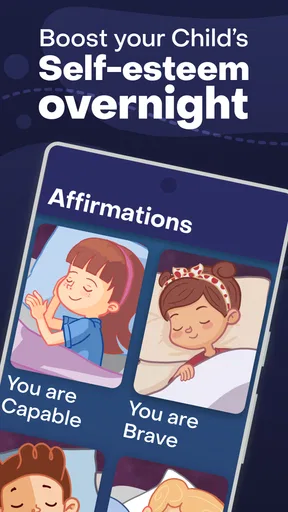
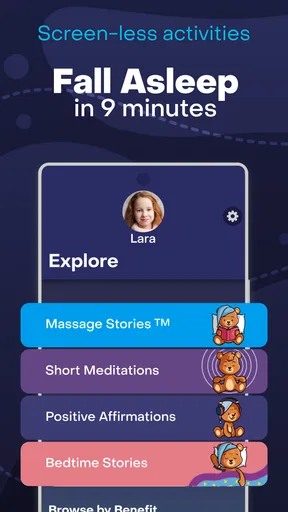
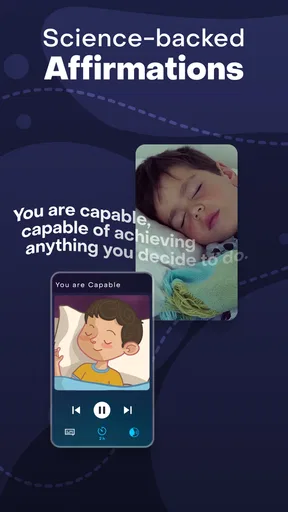
The app’s wider mix of stories, meditations, affirmations, prayers and gratitude moments gives it a different emphasis from a standard audiobook player. Instead of needing to find a long book and decide where to stop, a parent can choose a brief calming activity to suit the moment. The trade-off is that this is a guided, child-oriented kind of listening; someone looking for an unrestricted audiobook library or an elaborate sleep tracker may prefer a different tool.
Speed expectations and device demands
I wouldn’t choose a sleep app because I expect it to transform an older phone into a faster one. Storybook’s appeal is the listening routine, and the practical test is whether it opens and plays comfortably on the device you use at night. Its minimum OS requirement is 7.1, which gives some context for compatibility, but an operating-system requirement alone can’t promise the same responsiveness on every device.
For a smoother bedtime, I’d set up the app before settling a child: check that the phone is ready, pick the content, and place it somewhere out of the way. This avoids turning a sleepy moment into a search session. I would also keep the device’s screen from becoming a source of stimulation; the audio can be the focus while the display stays out of the child’s attention.
Using Storybook in a real family routine
I’d use this section to focus on how Storybook can fit around the parts of bedtime a family already enjoys, rather than asking everyone to rebuild the routine around a phone. Choosing an audio activity earlier in the evening can make the transition feel calmer, while keeping a familiar book or quiet conversation as a backup leaves room for nights when listening isn’t the right fit.
Heavy-use moments: make the choice earlier
The app is likely to be used most intensively during transitions: after a bath, when a child is still wound up, or when a parent needs a calm activity that doesn’t involve another video. A useful approach is to choose one story or relaxation activity before the routine begins, then treat it as a consistent cue rather than offering a long menu every night. Too many choices can invite negotiation when the goal is to wind down.
Worth Reading Before You Choose

Flipboard Shows What News Apps Must Do Beyond the Feed

Switching to Android Auto Means Rethinking Your Driving Routine

Google Calendar Makes a Crowded Week Easier to Manage

Ludo King Makes the Most of the Minutes Between Plans

Baby Panda World Brings Quick Play to Modern Phones, but Its Game Library Feels Busy

ESPN’s Live Game View Makes Following Close Games Easier
For example, after a busy weekday, I’d let a child choose between a story and a short meditation before getting into bed. Once chosen, the phone can be set aside and the adult can listen alongside them. On another night, a gratitude moment may suit a child who wants to talk about the day. These are different ways to use the app’s content, not a promise that a particular selection will make every child fall asleep.
Parents may also wonder whether the content is only for children. The app is clearly aimed at family bedtime, but an adult who enjoys gentle narration or simple relaxation prompts may find it useful too. I’d be less likely to recommend it to someone who wants clinical sleep advice or a detailed way to measure sleep; its strength is offering a shared, low-pressure wind-down activity.
Reliability, repetition and practical limits
Bedtime routines depend on predictability, so I’d test the app at a convenient time before making it part of a child’s nightly expectations. Try the chosen audio, check that the volume is comfortable, and make sure the device can be placed safely and conveniently. If something doesn’t work as expected, having a familiar spoken story ready as a no-phone backup can prevent a minor technical snag from turning into a longer bedtime struggle.
Storybook has an average rating of 3.9 from around 3,700 ratings, and it has been installed over a million times. Those figures suggest that many people have tried it, but they don’t tell me whether it will fit a particular family’s taste or device. I’d judge it by whether the stories and calming activities feel comfortable to repeat, and whether its approach suits the child who will actually be listening.
One subtle trade-off with audio at bedtime is that a child may become attached to a particular story or ask for another one after it ends. I’d set a clear expectation before pressing play: one selection, then lights out. That keeps the app from becoming a reason to extend screen time, and helps the listening itself remain part of the routine rather than an endless source of requests.
Choosing it over familiar alternatives
Compared with reading a paper book aloud, Storybook can offer a narrated option for evenings when a parent’s voice is tired or when an adult wants to share a calming activity without carrying the whole performance. Reading together still has an advantage: it is naturally interactive, and the adult can pause to answer questions or follow a child’s pace. I’d use the app when convenience matters, and keep books in the rotation when conversation and closeness are the point.
Compared with a general music or audio app, Storybook is more specifically shaped around children’s bedtime and family relaxation. That focus can make choosing a suitable activity simpler, while a general player may be better for adults who want broad music choices or their own preferred long-form audio. The free starting point makes it easy to explore, but in-app purchases range from $5.99 to $89.99 per item, so I’d check what is included and consider any purchase carefully rather than assuming every activity is free.
Who will get the most from it
I’d recommend trying Storybook if you’re a parent who wants a calmer alternative to handing over a video, or if a child responds well to listening as part of a predictable wind-down. It may also suit families who want to alternate stories with simple reflective or relaxation activities. The app is less compelling for a household that already has a bedtime routine everyone enjoys, for children who dislike audio, or for adults seeking a sleep-science tool rather than family-oriented content.
It is also worth remembering that an app can support a routine but can’t replace the parts that make a child feel secure: a steady bedtime, a comfortable setting and a responsive adult. I’d keep Storybook as one option, not the only way a child can settle. That makes it easier to skip it when the phone is unavailable or when a quiet conversation is more helpful.
Getting Started with Storybook
First things first, downloading and installing Storybook: Calm Bedtime, Sleep is a breeze. Available on both Android and iOS, this app is your ticket to dreamland. Once you open it, you’re greeted with a calming interface that immediately sets the tone. The colors are soft, and the layout is intuitive. You won’t find yourself lost in a maze of options, which is a big plus in my book.
A Treasury of Bedtime Stories
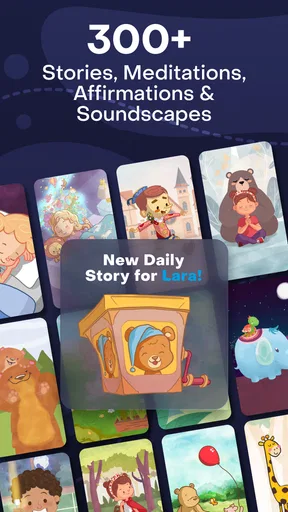
Now, let’s dive into the heart of the app: the stories. Storybook offers a delightful collection of bedtime tales that are perfect for both kids and adults. The stories are narrated in soothing voices, each designed to lull you into relaxation. I tried a few myself and found the variety impressive. Whether you’re into fairy tales or more modern narratives, there’s something for everyone.
The app also provides the option to read stories aloud, which is great if you’re tucking in little ones or simply prefer the sound of your own voice before nodding off. Plus, the stories are updated regularly, so there’s always something new to explore.
Relaxation Techniques and More
But wait, there’s more! Storybook isn’t just about stories. It also incorporates relaxation techniques to help you unwind. Think guided meditations and breathing exercises that complement the storytelling experience. I found these features particularly helpful on those nights when my mind was racing with thoughts.
One feature I love is the ability to set a timer for the meditations. This means you can drift off without worrying about your phone staying on all night. Just set it and forget it—literally.
Family-Friendly Fun
As a parent, one thing I truly appreciate is how family-friendly the app is. It’s a fantastic tool for bedtime routines with kids. The stories are engaging, and the relaxation techniques are simple enough for little ones to follow. Plus, it’s a great way to bond with your child as you both unwind from the day.
The app even includes a feature where you can create personalized playlists of stories and meditations. This is super handy for customizing your bedtime routine.
Final Thoughts
In a world that's always buzzing, finding peace and quiet can be a challenge. But with Storybook: Calm Bedtime, Sleep, I’ve discovered a little slice of serenity. The combination of soothing stories and relaxation techniques makes it a standout in the sea of sleep apps.
Whether you’re an adult looking to destress or a parent trying to get your child to sleep, this app is a game-changer. So, if you’re ready to embrace a more tranquil bedtime routine, give Storybook a try. Sweet dreams await!
Pros
- Engaging bedtime stories for kids.
- Soothing voice narrations enhance sleep.
- Easy-to-use interface for all ages.
- Variety of stories keeps content fresh.
- Offline access for uninterrupted use.
Cons
- Limited free content available.
- Requires regular updates for new stories.
- Can drain battery if used nightly.
- Narration speed not adjustable.
- Some stories may be too short.
FAQs for Storybook: Calm Bedtime, Sleep
What is Storybook: Calm Bedtime, Sleep app?
Storybook: Calm Bedtime, Sleep is a mobile application designed to help children relax and fall asleep through calming stories and soothing sounds. It combines narrated tales with ambient music to create a peaceful bedtime routine. Ideal for parents looking to establish a comforting sleep environment for their kids.
How does the app help improve sleep for children?
The app features a variety of narrated stories that are specifically designed to calm the mind and prepare children for sleep. The combination of gentle storytelling and relaxing background music helps reduce anxiety and stress, allowing children to drift off more easily and enjoy a restful night's sleep.
Is Storybook: Calm Bedtime, Sleep suitable for all ages?
The app is primarily designed for young children, typically those aged 3 to 10. However, older children and even adults may find the soothing stories and sounds beneficial for relaxation and stress relief. It's always a good idea for parents to preview the content to ensure it's appropriate for their child's age and sensitivity.
Are there in-app purchases or subscriptions required?
Storybook: Calm Bedtime, Sleep offers both free and premium content. While some stories and features are available at no cost, unlocking the full library and additional functionalities may require a subscription or one-time purchases. Users should check the app’s pricing details before downloading to understand the costs involved.
Can the app be used offline?
Yes, once stories and soundtracks are downloaded, the app can be used offline. This feature is particularly useful for parents who want to use the app during travel or in locations without internet access. Ensure that your device has sufficient storage space to download the desired content for offline use.


